To ensure everyone who participates in AncestryDNA® has control over who can see and manage their DNA results, every adult must register their DNA kit on their own account.
However, you can still access and manage multiple AncestryDNA® tests on your account if:
Follow the steps below to switch between DNA tests on your account.
Switching AncestryDNA® tests
From a browser
- From any Ancestry page, click the DNA tab and choose Your Results Summary.
- At the top of the page, click the down arrow
 next to the name of the person whose DNA results are currently shown.
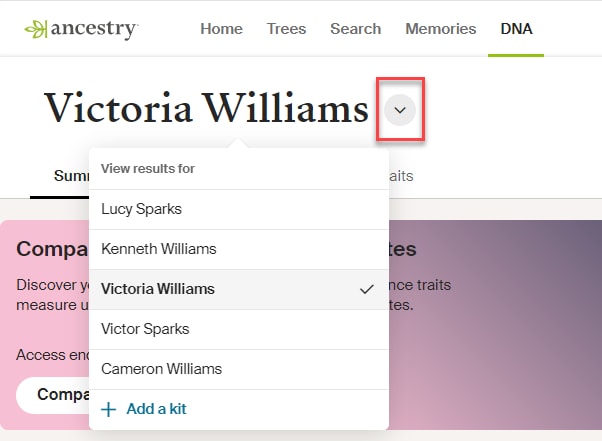
- From the drop-down menu, select a different test to view that person’s results.
From the app
- Open the Ancestry® app and sign in.
- In the top-left corner, tap your profile icon.
- Under Manage DNA test, tap Switch test (iOS) or Switch DNA test (Android).
- Under Choose A Test, select a different test.
That person’s DNA results will appear when viewing the app’s DNA screens.
Frequently asked questions
How do I see someone else’s DNA results?
To see someone else’s DNA results, ask them to share their DNA results with you.
Or, to compare your ancestral origins (regions and journeys) and traits with theirs, check out DNA Compare.
What if another adult wants to take an AncestryDNA test but doesn’t have an Ancestry account? Can I register their kit on my account?
No, each adult must have their own Ancestry account to register their kit and participate in AncestryDNA.
They should:
- Create a free Ancestry account.
- Register their kit.
- Share their DNA results with you when available.
This way, they control their DNA, and you can access their results from your account.


