Sometimes, information in a record or in another tree will conflict with a fact in your tree. For example, you may find your great-grandmother in someone else’s tree with a birthdate of January 1, while her birthdate in your tree is January 2.
When you add something to your tree that comes with conflicting information, you can decide which fact to keep—the new one, or the one you had. You could also keep both, making one of the facts primary and saving the other as alternate information. With the great-grandmother example above, if you believe the right birthdate is January 2 but you’re not sure, you can make January 2 the primary fact and save January 1 as alternate information.
If you’ve ever saved a fact as an alternate, you may see two facts listed for the same event in the profile of someone in your tree.
Saving alternate facts
When you save something with a conflicting fact, you’ll see a purple label that says DIFFERENT next to the fact.
If you want to replace your current fact with the new fact, check the box on the new fact. When the box is checked, you’ll see the option to save the original fact as an alternate. Check Save as alternate to save it, or leave it unchecked to delete it.

Finding, changing, or deleting alternate information
- In the profile of someone in your tree, click the Facts tab.
- At the top of the Facts column, click Filter and select Alternate Facts.
- Both the primary and alternate facts will be listed, with the alternate facts saying “Alternate.” Any gray facts listed are events in the life of their family member; to change those facts, go to that family member’s profile.
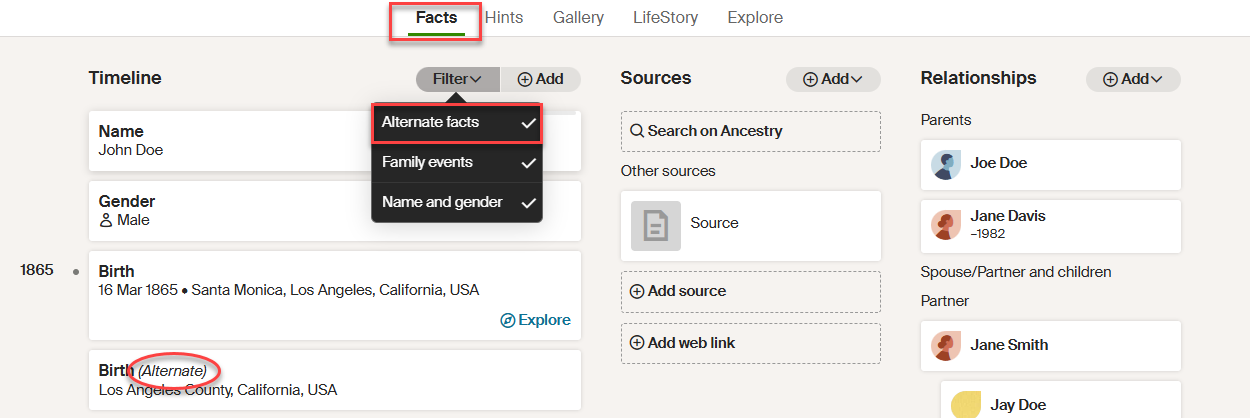
- To edit or delete a fact, hover over the fact and click the Edit button that appears when you hover.

- To change the details in the fact, edit the fields and click Save. To delete the fact, click DELETE in the bottom-right corner.
Troubleshooting
Duplicate facts that don't say "Alternate"
If see two facts for the same event and neither of them says "Alternate," you likely have duplicate people in your tree. For help, see Merging Duplicate People.


