When you mail your saliva sample, it goes to a laboratory, where a series of tests are performed. In most cases, you can expect your results within 6 weeks of the date we receive your sample.
In order for the laboratory to process your sample, you must register your kit. Registering your kit means connecting your DNA sample to your Ancestry account. When a sample is mailed in without being connected to an account, the laboratory isn't able to connect that sample to an account, so the sample isn't processed until a kit has been registered. If you mailed your DNA test in without registering, you can still register it if you have the instructions that came with your DNA kit; the registration code is printed on the back.
You’ll receive an email when the laboratory begins processing your sample. This email may arrive up to five weeks after you place your sample in the mail.
Checking the status
Check the status of your sample from your DNA homepage by clicking the DNA tab.
Testing stages
-
Extraction
The DNA in a sample is stored in immune system cells and cheek cells. To extract it, the laboratory places each sample into a container that passes through a series of robots. These robots take small samples of the saliva and perform various steps on it, including exposing it to chemicals and spinning it at over 10,000 rpm.
-
Amplification
The laboratory makes up to a thousand copies of the DNA through a process called PCR (Polymerase Chain Reaction) and moves it to a robot that guides it through chemicals, enzymes, and cycles of heating and cooling.
-
Reading
The laboratory applies your DNA to a SNP (single nucleotide variation, pronounced “snip") chip. This SNP chip reads the 700,000 markers that provide your ancestral origins and determine who you’re genetically related to. The chip works by binding manufactured DNA to your DNA, making it easily readable.
-
Communicating results
Another robot communicates the results from the chip. If the laboratory is unable to read at least 98% of the SNPs tested, they cannot provide results.
-
Creating a DNA Data file
When we receive the data, the As, Ts, Cs, and Gs (adenine, guanine, cytosine, and thymine) that make up sections of your DNA are turned into a DNA Data file:
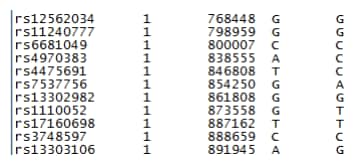
With the DNA Data file, we run algorithms that produce your origins results and DNA matches.
Troubleshooting
DNA sample hasn't arrived at the laboratory
Make sure you've registered your kit. If you registered your kit and see a status bar on your DNA homepage, but the sample hasn't arrived, keep in mind that it can take up to five weeks from the date you mail in a sample for the laboratory to mark it as arrived. It's also not uncommon for two DNA kits sent in at the same time to be marked as arrived some days apart.
"You Are Not Authorized to Access This Page" Error
If you received an email informing you that your results are in, but you clicked the link in the email and arrived at a page that said "You Are Not Authorized to Access This Page", sign out of the Ancestry® account you're in, then sign in to your account and click the DNA tab.
DNA homepage issues
If you see an ad on your DNA homepage instead of a status bar or your results, make sure you're signed in to your account and that you've registered your kit.


