You can now ask anyone–with or without an Ancestry® account–for help filling in information about the people in your tree. The individuals you ask don’t need to sign in or create an account.
Asking for information
“Ask someone for info” is not currently available in the Ancestry mobile app. To use the “Ask someone for info” feature, use the Ancestry website.
From a family tree:
- Click on someone you want more information about.
- On their opened card, click the three dots
 and select Ask someone for info or a photo.
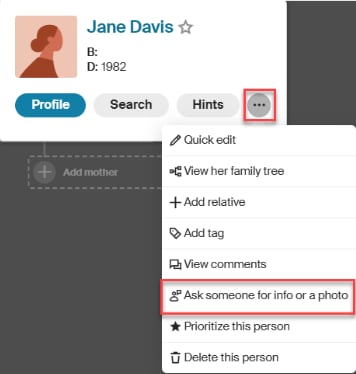
- Choose how you want to request information.
From a person’s profile page:
- In the top-right corner, click Tools and select Ask someone for info or a photo.
- Choose how you want to ask for information.
Ways to ask for information:
- Send an email: Click Send an email, choose your email program, enter the recipient’s email address, personalize the message (optional), and send.
- Share a link: Click Copy link and paste it anywhere you want to ask for more information.
- Message an Ancestry member: Click Message an Ancestry member, personalize the message (optional), and select Send.
Note: Only one person can respond to each request. To ask multiple people, send separate emails or share a new link with each individual.
Reviewing suggested information
When someone submits suggested details about a person in your tree, we send you an Ancestry notification. To review the suggested information:
- In the top-right corner, click the bell
 icon.
icon.
 A numbered red dot means you have that many unread notifications.
 - No dot means you have no new or unread notifications.
- Select the notification about suggested details.
- On the right, compare their suggested information to your tree.
- If needed, turn on Compare details using the toggle switch.
- Choose Yes to save the information to your tree, or No or Maybe if you don’t want to.
- Check the boxes next to any facts you want to add, and uncheck those you don’t want.
- NEW: facts not yet in your tree.
- DIFFERENT: facts that don’t match your tree.
- Click Save to tree.
Frequently asked questions
I own more than one tree; can I ask questions about the people in each tree?
Yes, you can request information about individuals in any tree you own.
Someone shared a tree with me; can I ask others for information about people in that tree?
No, only tree owners can request information about the people in a tree.
Who can see my Ancestry notifications and review suggested information?
Your Ancestry notifications are visible only to you. Others (including anyone you’ve shared your tree with) cannot see your notifications or review and accept suggested information about people in your tree.
Why don’t I see the option to Ask someone for info or a photo?
You may not be the tree’s owner. The option to Ask someone for info or a photo is only available for tree owners, as they’re the only ones who can decide whether to accept suggested information into their tree.
Can I cancel a request for information?
No, but you can ignore or dismiss any notifications with suggested information you no longer want.
Is the “Ask someone for info” feature available in the Ancestry app?
No. The “Ask someone for info” feature is not currently available in the Ancestry mobile app. To use the “Ask someone for info” feature, use the Ancestry website.


