Print
You can cancel or modify your Ancestry® membership at any time. Canceling does not delete your trees, DNA, or Ancestry account. Once canceled and expired, your account will automatically become a free registered guest. To learn more, read Ancestry® Accounts after Cancellation.
Select what you want to do:
Turning off automatic renewal
Except for gift memberships, all Ancestry memberships and trials automatically renew. To turn off automatic renewal and prevent future charges of your Ancestry membership, follow the cancellation steps below.
Canceling an Ancestry® membership or trial
To cancel an Ancestry membership or trial, follow the steps below until you receive a cancellation confirmation number. If you have multiple memberships, repeat the steps for each one.
- Go to Account Settings.
- In the Membership section, find the membership you want to cancel and click Cancel membership or Cancel trial.
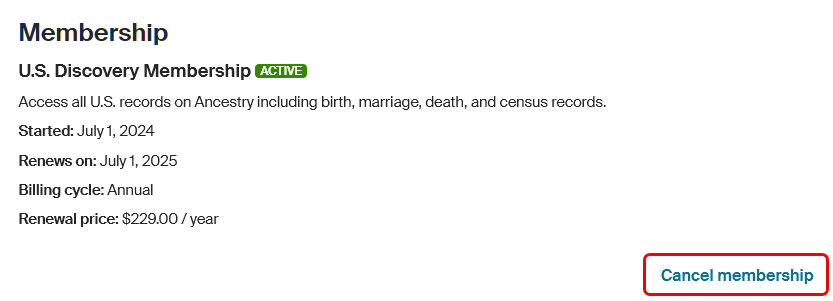
If you don’t see “Cancel membership” or “Cancel trial” you may have:
- A FREE account called a Registered guest that doesn’t require cancellation.
- A gift membership that doesn’t automatically renew and, therefore, doesn't require cancellation.
- A family plan you’re invited to but didn’t purchase. Only the person who bought a family plan can cancel it. To leave a family plan, read leaving a family plan.
- More than one account. If you’ve been charged but don't see a paid membership in your account settings or recent charges in your order history, you may have more than one Ancestry account. Contact us to locate any other accounts that may be billing you.
- If asked, choose if you want to pause, switch, keep, or cancel your membership, then click Continue.
- Select your reason(s) for canceling, and if asked, choose when you’d like your membership to end, then click Continue. “Continue” will be gray until all required selections are made.
- If offered other options, choose what you want to do:
- Select an offer and click the button provided.
- Keep my membership to stay on your current plan.
- Cancel my membership to continue canceling.
- If canceled successfully, a confirmation number will appear. To print it, click Print. A confirmation email will also be sent to your email. Save your cancellation confirmation number in a safe place.
Canceling memberships with our other brands
If your Archives®, Newspapers.com™, or Fold3® membership is bundled with your Ancestry membership, canceling your Ancestry membership will also cancel access to these brands.
If you’re billed by one of our other brands—Archives®, Newspapers.com™, or Fold3®—select them below and follow their cancellation steps:
Frequently asked questions
Select a question below to view the answer. Select the question again to hide it.
What happens if I cancel in the middle of my membership period?
Good news! If you cancel with time left on your membership, you can keep using your membership’s benefits until it expires. For example, if you started a monthly membership on the 1st and set it to cancel at the end of the current month, you can use the membership for the rest of that month.
To see your current membership, status, billing details, and expiration date (when canceled), visit the Account settings page. For help, check out Finding Your Membership Status and Billing Details on Ancestry®.
How do I know my membership or trial was successfully canceled?
You’ll know your membership or trial is canceled when you receive a cancellation confirmation number on screen or by email. If you didn’t get one, try repeating the cancellation steps.
You can also check your Account settings to see your membership status, billing details, expiration date, and confirm the cancellation. For help, check out Finding Your Membership Status and Billing Details on Ancestry®. If your membership is still active and you need help canceling, contact us.
What happens to Pro Tools if I cancel my family history membership?
Pro Tools needs an active family history membership. If you cancel your family history membership, you'll have access to its benefits until the "Expires" date on your Account settings page. After that, your Pro Tools membership will automatically be canceled at the end of its current paid month.
What happens to my family history membership if I cancel Pro Tools?
Canceling Pro Tools will only end your Pro Tools membership—it won't affect your family history membership. You'll still have access to Pro Tools benefits until the "Expires" date on your Account settings page. To cancel your family history membership, follow the cancellation steps above to cancel it separately.
Can I get a refund?
For information about refunds, read Ancestry® Renewal and Cancellation Terms.
What happens after cancellation?
Once your membership is canceled, you'll still have an account with Ancestry as a registered guest. Registered guest accounts are free and provide access to many free resources on Ancestry. For more information, read Ancestry® Accounts after Cancellation.
Why was I charged after I canceled my membership?
If you were charged after canceling your Ancestry membership(s), here’s why it might have happened:
- Membership was canceled too close to renewal. Some billing providers require you to cancel at least 24 hours before your next billing cycle starts. If you were billed through Ancestry, read our Renewal and Cancellation Terms. Otherwise, contact your billing provider for details. Find out who bills you for Ancestry.
- Membership was paused, then resumed. If your membership was paused for a month or two, payments could have resumed when you unpaused it or on the “Renews on” date listed in your account settings during your pause. Not all memberships can be paused. If you paused one membership but had another active membership, you might have been billed for the other active membership. Learn more about Pausing a Membership or read our Renewal and Cancellation Terms.
- Membership is still active. Your membership might not have been fully canceled and may still be active. Check if your membership is still active and cancel if needed.
- If you cancel your membership, check your inbox for a cancellation confirmation email from Ancestry or your billing provider—without one, your membership likely isn't canceled. If you were charged after receiving a cancellation confirmation number, contact us for help.
- Uninstalling the Ancestry app does not cancel Ancestry memberships.
- Multiple memberships are not canceled. You might have more than one membership (on a single account or across multiple accounts) and only canceled one. Make sure each membership is fully canceled to stop future charges.
- Multiple Ancestry accounts. If you’ve been charged but don't see a paid membership in your account settings or recent charges in your order history, you may have more than one Ancestry account. Contact us for help finding any other accounts you have.
- Early termination fees. Some memberships have early termination fees. You may have been charged an early termination fee if you canceled before the end of your membership. Check your order history and read our Renewal and Cancellation Terms for more details.
Why am I being charged a fee to cancel my membership?
Purchases of some semi-annual and annual memberships that are paid monthly come with a significant discount. Therefore, a cancellation fee applies if you cancel before the end of your membership period. For more information, read our Renewal and Cancellation Terms.
How do I delete my Ancestry account?
If you delete your Ancestry account, all information on your account will be permanently deleted. This includes, but is not limited to, your family trees, records, photos, and DNA results.
In contrast, if you only cancel your membership, billing for the canceled membership will end, but your trees, DNA, Ancestry account, and more will remain.
If you still want to delete your Ancestry account, read Deleting Your Ancestry® Account.
How do I restart my membership?
You can restart your Ancestry membership anytime. For help, check out Restarting or Renewing Your Membership.
What should I do if I get a blank page when trying to cancel?
If you see a blank page when trying to cancel, check out Fixing Page or Button Problems on Ancestry® or contact us for help.


