DNA Data (or machine readable biometric data) is the data generated in the lab from AncestryDNA® tests. It’s used to determine your ancestral origins, and match you to your genetic relatives. This uninterpreted data is also called “raw data.”
DNA Data can be downloaded in a .txt (text file) format. DNA Data from other websites cannot be uploaded to Ancestry®.
Go to DNA Settings
- From your DNA Settings, select the test you'd like to download.
- Scroll down to the Download or Delete section and select Download DNA data.
- Select the box to confirm that you understand, and click Continue.
- Verify your account by choosing 1 of 2 methods:
- Click Enter current password. Enter your password into the field and click Continue.
- Click Send code via email > Send code. Retrieve the code from your email inbox and enter it into the Enter Code field. Click Continue.
- In the email, select Download DNA Data. Please note: The downloaded file will not be in the email. The email can take up to 24 hours to arrive. If you make a second or third request to download, only your most recent email message from Ancestry (associated with your most recent download request) will have a valid link. A download link can be used just once. It will expire after a week. If your link has expired, start over at step 1.
- Click Download DNA Data.
- The file will be downloaded to your computer. The file name will be dna-data-(date).zip. If you can’t find it, check your Downloads folder or search for the file name (if you have a PC) by clicking the Windows key
 on your keyboard and entering the file name in the search field that appears. If you have an Apple computer, select the Spotlight icon
  in the top-right corner of your screen and enter the file name in the search field. To open the file, double-click it.
Reading your DNA Data
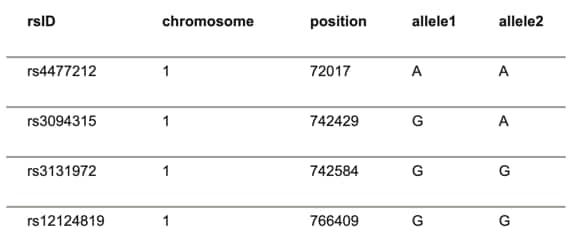
Here’s an example of what the data looks like:
To understand this, let’s take a quick step back and delve a little into DNA.
The instructions for making you are found in the over 3 billion bases in your DNA. Each base can come in one of four varieties: A, G, C and T. Although all humans have the same letters at nearly every one of these positions, there are a few that vary. These positions are called single nucleotide polymorphisms or SNPs (pronounced “snips”). Your unique self comes partly from what letter you have at these variable positions.
DNA is organized into 23 separate pieces, called chromosomes. Most people get one set of 23 from each parent, for a total of 46.
Now we’re ready to tackle DNA Data.
The first column in your DNA Data is the rsID, or Reference SNP cluster ID. This is a unique identifier, a way to show which part of your DNA we’re referring to. The second column tells you which of the 23 chromosomes we’re looking at. (In some cases, the X and Y chromosomes are referred to as 23 and 24.) The third column is the exact position on the chromosome. For example, chromosome 1 is around 249 million bases long. The first row is looking at the position number 72,017th base.
The last two columns contain your data. Since we have two copies of most of our chromosomes, we have two bases at most positions. Sometimes, they’re the same (like the two A’s in the first row), but they can also be different, like in the second row. “Allele” is the scientific word for which letter you have at a variable spot.
Besides having a different letter, people can sometimes have a bit of missing DNA (a deletion) or a bit of extra DNA (an insertion). We show this with an “I” for extra DNA and a “D” for missing DNA.
Each chromosome is composed of two complementary strands (often called “forward” and “reverse”), and alleles may be reported on either strand. A SNP genotype that is G G on the forward strand will be C C on the reverse strand. Likewise, G A on the forward strand is C T on the reverse strand. AncestryDNA reports data for the SNPs on the forward strand with respect to the human reference genome (GRCh37). The genotype (the observed pair of alleles at each position) will be provided on the genomic forward strand.
Security
Your DNA Data is protected by a number of security measures:
- Your DNA sample is identified only by a barcode—the laboratories don't have access to your identity.
- We store all DNA data in encrypted databases to ensure restricted access, even within the company.
- Only the owner of a test and anyone made a manager by the owner has access to a test's DNA Data. Neither matches nor people invited to view the test have access.
Once you download your DNA Data, your downloaded copy is no longer under the protection of our security measures. See our Terms and Conditions and AncestryDNA Privacy Statement for more information. Because other companies use different algorithms, database, or data translation methods, your results may differ on another site. If you upload your DNA Data to another site, we recommend ensuring that they have these features in place:
- A privacy policy or statement that outlines the steps taken to secure your data
- An institutional review board that ensures ethical compliance regarding how your data is used
- The option to delete your data at any time
- A secure website that's password-protected and uses SSL encryption
Troubleshooting
Download error
If you receive a download error message when trying to download your DNA Data, clear your cache and cookies and make sure you have enough memory available on your device for the downloaded file.
Didn’t get the DNA Data email
It can take up to 24 hours for the email to arrive. Make sure you’re checking the email address associated with your Ancestry account by clicking your name or username in the top-right corner of Ancestry and selecting Account Settings. The email address associated with your Ancestry account will be listed in the Your Account section. If you’re in the right email account, check your junk folder and add *ancestry.co.uk to the safe senders list in your email account. If you still don’t receive the email, please contact us.
Invalid link
Only one link is valid at a time. If you made more than one download request, only your most recent request is valid. It can take up to 24 hours for the email to arrive. Make sure you are selecting the most recent emailed link (associated with your most recent download request) from Ancestry.
Frequently asked questions
Can I download or export my list of dna matches?
DNA match lists cannot be downloaded or exported at this time.


