To find information about an adoption, try the strategies below.
Take an AncestryDNA® test
If you’re the biological child or parent involved with an adoption, or if you’re biologically related to people involved with an adoption, we recommend taking an AncestryDNA® test. If someone you’re looking for has also taken the test, you’ll appear on each other’s lists of DNA matches. Even if you don’t match with close family members, more distant matches may have information that could help your search.
Enter biological family in a family tree
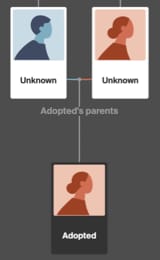
If you don't know the names of the biological parents (or the birth name of the child), you can still add each of them to a tree on Ancestry®. Call the parents “Unknown” and the child “Adopted” (along with any other information you know, such as birthdate and birth location).
Add more information to the tree as you come across it. This tree can serve both as a place to consolidate your research and as a tool to find new information. As you add facts to the tree, you may find that we attach Ancestry Hints® to the tree—records that likely contain information about people in your tree.
Search for adoption records in the Birth, Baptism & Christening index
If you know the birth name and birthdate of the adopted child, start the search there.
Search Birth, Baptism & Christening(or from any page on Ancestry, choose the
Search tab >
Birth, Marriage & Death, including Parish >
Birth, Baptism & Christening on the right.)
- Enter any information you know and choose Search.
- Select any records listed on the right side that match the information you entered. Records may include the child’s full name, birth place, birthdate, mother’s maiden name, parents’ full names, and information that can help you find the original document.
- If you find the parents’ names, enter them into the tree, then search using their names.
Search for orphanage records in the Census & Electoral Rolls index
If you’re looking for orphanage records and know the child’s original name, try searching census records with the name and using keywords “orphan” or “orphanage.” This can turn up the name of the orphanage at which the child lived. In older censuses, children who lived at orphanages may have been referred to as “inmates.”
Search Census & Electoral Rolls
(or from any page on Ancestry, choose the Search tab > Census & Electoral Rolls.)
- Enter the child’s name with as much other information as you know.
- Enter “orphan” or “orphanage” in the Keywords field and click Search.
- From your list of search results, click on a census or index to view details. Clicking on a record will bring you to a list of facts from the record.


