Adding full and half-siblings to a tree
Siblings are connected through their shared parent(s)—full siblings through two parents and half-siblings through one parent. To add siblings to your tree, you must have at least one shared parent in your tree.
- Add at least one of the siblings' parents to your tree. If you don't know the parent's name, add them as "Unknown."
- Click on the siblings' parent. This should be a shared parent for a half-sibling or either parent for a full sibling.
- In the opened card, click More options
 (the three horizontal dots), select +Add relative, and then choose Child.
 - Enter the sibling's information.
- In the Parents section at the bottom, select the correct set of parents for that person and click Save.
Adding stepsiblings and stepparents to a tree
To add a stepparent, add the stepparent as a spouse to the child's parent but uncheck the "Include these individuals as children of this spouse" box.
To add a stepsibling to a tree, add the stepparent first, then their child.
- In your tree's toolbar on the left, click the View
 icon and select Vertical. If you're already viewing the tree in the vertical view, nothing will change.
 - In your tree, click on the person married to a stepparent. For example, if Bob’s mom is married to Bob's stepdad, click on Bob’s mom.
- In the opened card, click More options (the three horizontal dots), select +Add relative, and then choose Spouse.
- At the bottom of the screen, uncheck Include these individuals as children of this spouse. If this option doesn't appear, skip this step.
- Enter the stepparent’s information and click Save.
- In your tree, click on the stepparent you just added.
- In the opened card, click More options (the three horizontal dots), select +Add relative, and then choose Child.
- Enter the stepsibling's information.
- In the Parents section at the bottom, select the option that includes Unknown Mother / Father and then click Save.
Correcting a full or half-sibling error
If someone in your tree mistakenly appears to be a full or half-sibling, correct the issue by changing the parents they’re attached to.
- In your tree, click on someone who mistakenly appears as a full or half-sibling.
- In the opened card, click Profile.
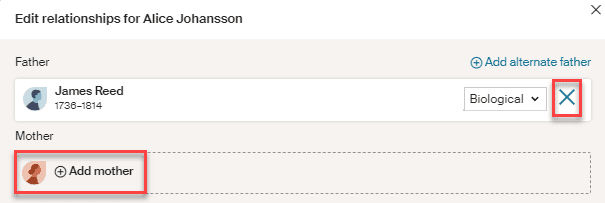
- In the top-right corner of their profile page, click Edit and choose Edit relationships.
- Add or remove any necessary parent relationships.
- Listing them as a Half-sibling: Next to a parent they don't share with their half-sibling, click the X and then Remove. They should now appear as a half-sibling.
- Listing them as a full sibling: click + Add mother/father for whichever parent is missing.
- To select someone in your tree: enter their name and select it when it appears, then click Save.
- To add a new person: click Add new person, enter their information, and click Save.