Tree insights can help you discover trends and see patterns in your tree, like:
- The top 5 most common last names
- The top 5 oldest people
- The top 5 women with the most children
- The top 5 people who married the youngest
Accessing tree insights
To see tree insights, you need an active Ancestry® Pro Tools Membership.
To access tree insights:
- Sign in to Ancestry® and go to the homepage by clicking Ancestry in the top-left corner.
- On the homepage, in the top-right corner, find Pro Tools shortcuts.
- Under Pro Tools shortcuts, click More Pro Tools.
- Under Tree insights, select Explore your insights.
You'll see insights for the last tree you viewed that you own or can edit. To see insights for a different tree, open that tree first, then follow these steps again.
Note: You can only access tree insights for trees you own or can edit. For other trees, ask the owner or editor to share the insights with you.
Sharing tree insights
- Find a tree insight you’d like to share.
- Under the tree insight you’d like to share, select Share, then choose a sharing option:
- Family groups > choose a group > add a message (optional) > Share.
- Ancestry Message > choose or enter a recipient > add or edit the message > Send.
- Email > If prompted, select your email program > choose or enter a recipient > add a message > send email.
- Facebook > If prompted, log in to your Facebook account > add a message > Post to Facebook.
- WhatsApp > Choose or enter the contacts/chats you want to share the record with > select the button to forward the record to those chats.
- X > If prompted, log in to your X account > add a message > Post.
- Copy Link > Selecting this will copy the link to your clipboard. Paste this link anywhere you want to share the record.
- Download > The record will be downloaded to your computer. If you can’t find it, check your Downloads folder. If you receive a download error message, clear your cache and cookies and make sure you have enough memory available on your device for the downloaded file.
Viewing tree insights shared with you
- Select the tree insights link.
- If prompted, sign in to your Ancestry account or create one for free.
- View the shared tree insights.
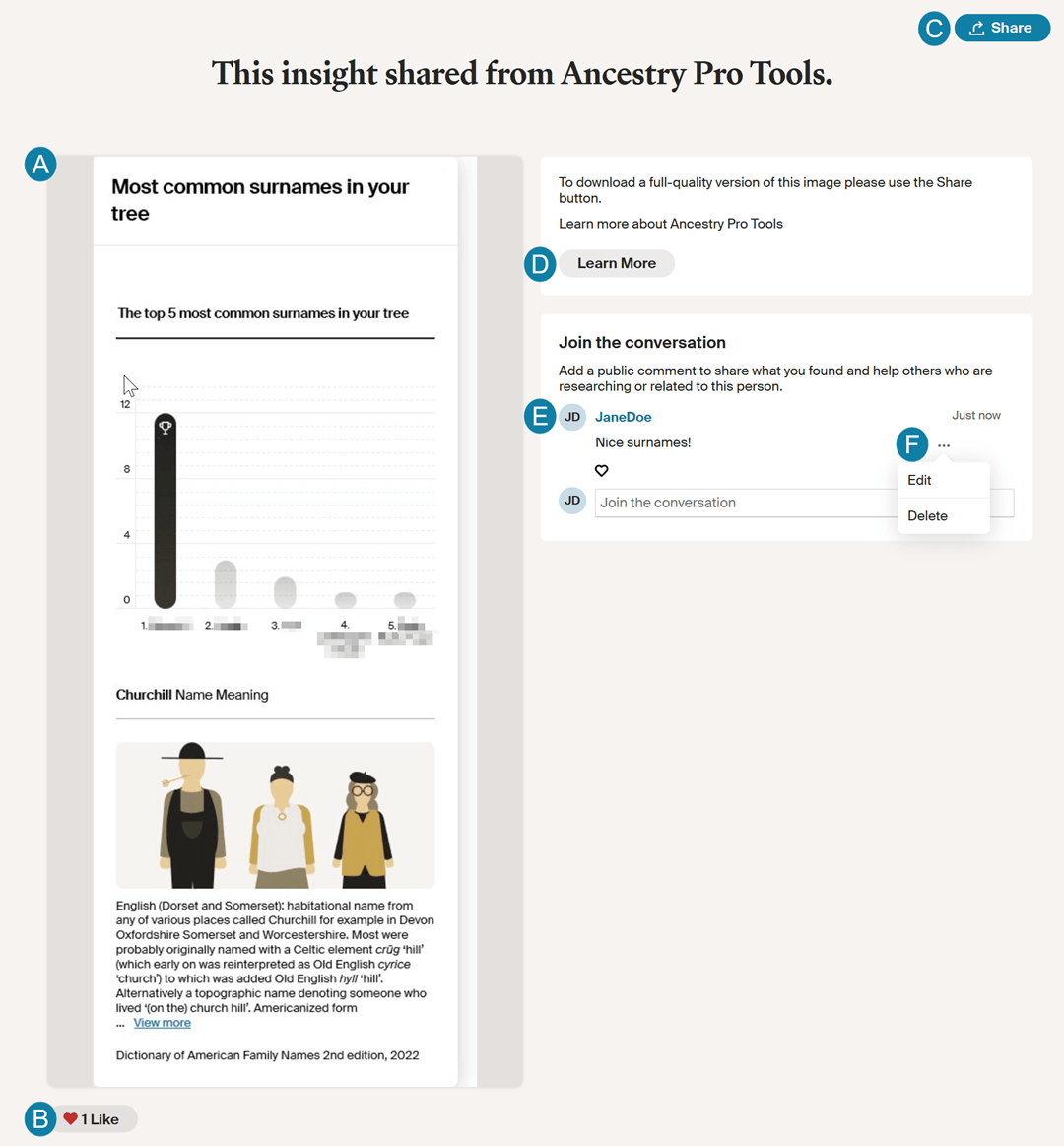
- Insights image.
- Likes. Select the heart to show you like the insight.
- Share. Re-share the tree insight or download the full-quality image.
- Learn more about Ancestry Pro Tools. Visit the Pro Tools membership page for details on what’s included, pricing, or to start the membership.
- Public comments. Sign in to leave a comment. If you don't have an account, create one for free.
- Comment options.
- Edit or delete your comments.
- Flag or hide comments from others.
Frequently asked questions
Which trees can I access tree insights for?
Tree insights can only be accessed on trees you own or can edit. For other trees, ask the owner or editor to share the insights with you.
How do I see insights for a different tree?
When you open Tree Insights, you’re shown insights for the last tree you viewed that you own or can edit. To view insights for a different tree, go to that tree and then re-access tree insights.
Are these tree insights available in the Ancestry app?
No. Tree insights are not currently available in the Ancestry mobile app. However, they are available on the Ancestry website with an active Pro Tools membership.


