Use notes and comments to record facts, stories, tasks, or thoughts about people in your tree.
Who can see your notes and comments?
Only you and those invited to your tree as an editor can see and write notes.
Comments, on the other hand, follow your family tree's privacy settings.
- If your tree is public, your comments will also be public (for deceased people). Comments connected to living people are automatically private.
- If your tree is private, only people you've invited to your tree can see your comments.
If you comment on someone else's tree, anyone who can see that person and tree can see your comment.
Viewing notes and comments
You can find all the notes and comments attached to someone in your tree from that person’s profile page. Access notes and comments to the right of their profile photo, in the research tools bar, and in the Tools menu. (If you don't see the research tools bar, select Tools > Show research tools.)
Currently, you can't view notes and comments for everyone in a tree in one place.
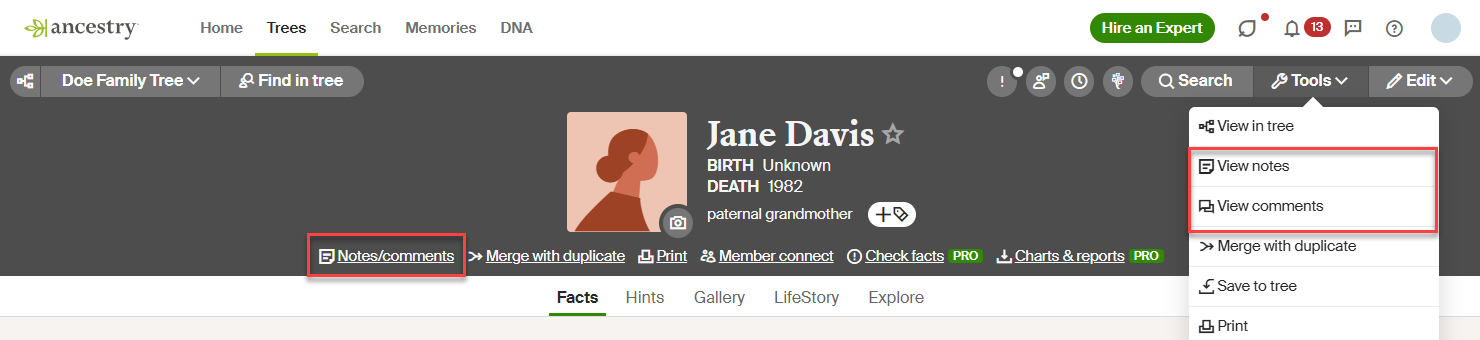
Writing and editing notes and comments
From the profile page of someone in a tree, click More options  (the three horizontal dots) then View notes or View comments.
- To write a note, select the Notes tab and start typing. To edit a note, make your changes under the Notes tab. Notes and edits to notes are saved automatically. To copy and paste the text into the note, copy the text from the source, then right-click (or Ctrl+click, for Macs) in the Notes field and select Paste.
- To write a comment, select the Comments tab, enter your comment, and choose Submit. To edit or delete a comment you left, go to the comment and select Edit or Delete.
Deleting, hiding, and flagging comments
Deleting: You can delete your comments and the comments others leave on a tree you own. To delete a comment, click Delete beneath the comment. To undo the deletion, click Undo. Once click the x to hide the "undo" option, you won't be able to reverse the deletion anymore.
Hiding: You can hide other people's comments on trees you own. Once you hide a comment, you'll no longer see it, but anyone else who has access to your tree will still be able to see it. To hide a comment, select Hide beneath the comment. To undo the hide, click Undo. Once you click the x to hide the "undo" option, you won't be able to undo the hide anymore.
Flagging: You can flag other people's comments on trees you own. To flag a comment, select Flag beneath the comment. Select the reason, then follow the on-screen directions.


